I used to watch AI coding agents and chatbots struggle with a frustrating form of “structural blindness”. Every time I asked an AI to fix a bug or analyze a document, it acted like a researcher who walks into a library, scatters papers across a desk, answers one question, and then sweeps everything into the trash. It had no memory. It read the same files over and over, burning through thousands of expensive tokens and hallucinating connections that did not exist.
To fix this, I dove deep into the world of precomputed AI context layers. I experimented with three game-changing graph structures: GitNexus, Graphify, and Andrej Karpathy’s LLM Wiki Pattern.
This is the ultimate, evergreen guide on what I learned, how I built these systems, and how you can use them to give your AI assistants a permanent “nervous system”.
🗺️ The Core Problem: Why AI Needs a Map
Standard AI tools use flat searches. When you use traditional Retrieval-Augmented Generation (RAG), the system chops your files into random text blocks, runs a quick keyword or similarity search, and feeds those fragments to the AI.
This flat approach fails for two massive reasons:
- In Software Engineering: An AI coding agent might read a single file but fail to realize that changing line 50 will break a downstream service or call an outdated API hidden three folders away.
- In Knowledge Management: A standard chatbot treats every prompt like day one. It never accumulates knowledge or spots high-level trends across a multi-page business archive.
By pre-compiling data into structured graphs, we stop treating the AI like an amnesiac. We give it an architectural map before it ever types a single line of text.
1. GitNexus: The Agent’s Zero-Server Nervous System
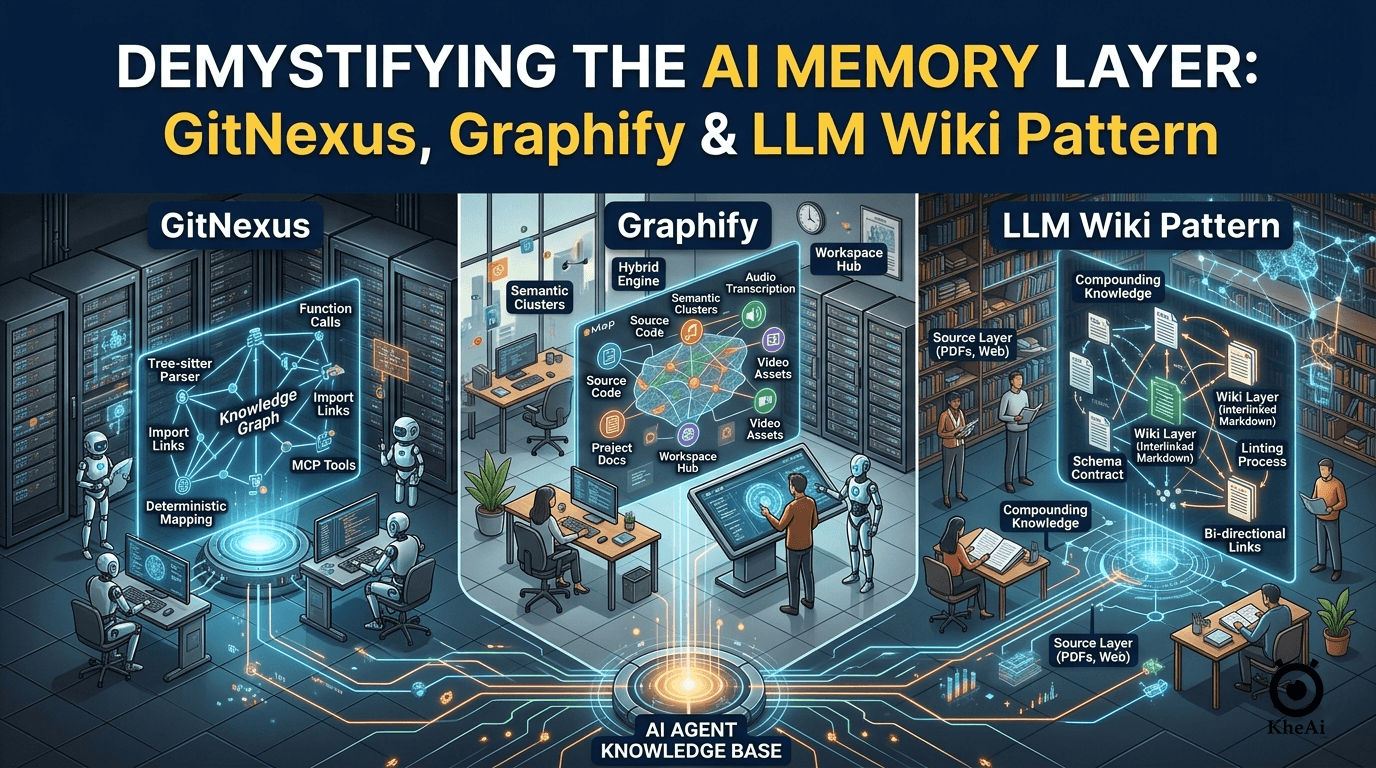
GitNexus is a client-side engine designed specifically for codebases. It runs entirely within your browser or local system to turn a local repository or ZIP file into a highly rigid, deterministic map.
- How I Used It: I integrated GitNexus into my terminal workflows using the Model Context Protocol (MCP).
- The Mechanism: It uses a parser called Tree-sitter to read source code directly. It acts without an LLM during the mapping phase, completely eliminating token costs and hallucinations. It charts exact programming realities like
Function X calls Function YorClass A inherits from Class B. - The Magic: It exposes these relationships to AI agents (like Cursor or Claude Code) via MCP tools. When the agent wants to modify code, it queries the precomputed index rather than scanning files blindly.
2. Graphify: The Multi-Modal Workspace Navigator
Graphify is an open-source Python tool that expands the scope of code intelligence. While GitNexus stays strictly within the lines of software code, Graphify bridges the gap between your codebase and your messy project materials.
- How I Used It: I used Graphify as a project-scoped skill for coding assistants to map mixed workspaces containing code, design docs, and onboarding videos.
- The Mechanism: Graphify uses a brilliant three-pass hybrid engine:
- Pass 1 (Deterministic Code Mapping): Uses Tree-sitter to parse syntax trees and map structural code links without wasting API tokens.
- Pass 2 (Audio/Video Processing): Automatically transcribes workspace audio and video assets using local transcription tools.
- Pass 3 (Semantic Document Analysis): Uses a language model to extract concepts and tag relationships from images, PDFs, and text markdown.
- The Magic: It clusters related data into semantic “communities” and exports the entire structure into visual formats or an Obsidian vault. This cuts AI token usage down by up to 70x because the model reads high-level summaries instead of raw data grids.
3. The LLM Wiki Pattern: The Compounding Human Encyclopedia
Inspired by AI researcher Andrej Karpathy, the LLM Wiki Pattern completely flips the script on traditional RAG. Instead of mapping mechanical files, it treats raw human text like source code and “compiles” it into an evolving, self-healing digital Wikipedia.
- How I Used It: I deployed this pattern to organize hundreds of pages of research notes, customer feedback logs, and technical documentation into an interconnected concept web.
- The Mechanism: It relies on a rigorous three-layer architecture:
- The Source Layer: Immutable, raw files like PDFs, websites, or articles.
- The Wiki Layer: Interlinked markdown files created by the LLM, containing summary logs, entity definitions, and precise bi-directional backlinks.
- The Schema Layer: A strict operational contract that tells the LLM exactly how to write, format, and organize pages.
- The Magic: The system runs a regular linting process. The LLM acts as an editor that scans the wiki to fix conflicting information, resolve stale claims, and generate new links between isolated topics.
📊 Structural Comparison: Code Graphs vs. Concept Wikis
To understand how these tools fit into your workflow, look at how they treat data structures, relationships, and audiences:
| Feature Dimension | GitNexus | Graphify | LLM Wiki Pattern |
|---|---|---|---|
| Primary Input | Local software repositories. | Mixed multi-modal codebases and workspaces. | Unstructured text, research docs, and articles. |
| Core Entity Types | Functions, classes, and file dependencies. | Code modules, text documents, and audio/video files. | People, specific concepts, events, and topics. |
| Relationship Rules | Fixed and deterministic (e.g., Imports, Calls). | Hybrid (Hard-coded AST links + scored semantic associations). | Fluid and interpretive (e.g., Influenced by, Contradicts). |
| How Clusters Form | Structural file folders and microservice packages. | Algorithmic network communities and ranked folders. | Semantic concepts, topic similarity, and shared meanings. |
| Primary Reader | AI Agent (via direct MCP tools). | AI Agent (built as an optimized navigational map). | Human Users (built like an interactive encyclopedia). |
🛠️ Step-by-Step: How to Build and Run These Systems
Here is exactly how I configured and ran these tools on my local system.
Setting Up GitNexus for AI Agents
To give an AI agent a complete architectural understanding of a code repository, run these commands in your project terminal:
# 1. Analyze and map the repository structure
npx gitnexus analyze

# 2. Automatically register the MCP server with your local AI coding agents
git nexus setup
Once registered, your AI agent automatically leverages seven built-in graph tools to run blast-radius impact analysis before editing code.
Deploying Graphify for Multi-Modal Environments
To optimize your workspace context and lower token usage inside tools like Claude Code, use this quick workflow:
# 1. Install the tool globally using uv or pipx
uv tool install graphifyy

# 2. Register the skill with your AI assistant environment
graphify install --project

# 3. Compile the folder workspace into an interactive knowledge map
/graphify .
This processes your code and local documentation, outputting a highly readable GRAPH_REPORT.md file and an optional Obsidian vault layout.
Implementing the LLM Wiki Pattern
For building a compounding personal knowledge engine out of text files, set up an organized, three-folder system:
/sources: Drop your unedited, raw PDF or text documents here./wiki: Let your LLM read the sources folder to auto-populate this directory with individual markdown concept files linked together with[[wiki links]].schema.json: Define the strict parameters, naming conventions, and category classifications the LLM must follow.
💡 Architectural Lessons: When to Use Which
Navigating these tools taught me that you must choose your architecture based on your task and your primary reader:
- Choose GitNexus when you are actively writing and changing code. It serves as an immediate, real-time safety net. It ensures that an AI agent cannot make blind edits that cause silent, breaking errors in remote areas of your app architecture.
- Choose Graphify when you are onboarding or auditing. It is the ultimate tool for organizing multi-modal project materials before you start making structural alterations. It acts as a bridge that brings technical specifications, videos, and source code into a shared conversational view.
- Choose the LLM Wiki Pattern when you are building a long-term knowledge base. If your goal is to help humans and chatbots study text, research ideas, or track business insights without losing historical perspective, compiling an evolving text wiki is the ideal approach.
By pairing these graph tools together, I completely eliminated AI amnesia in my technical workflows. My software agents have a precise map to follow, my documentation updates itself, and token costs remain drastically lower than before.