Navigating the Gemini API ecosystem can feel like drinking from a firehose. Between shifting rate limits, new embedding models dropping, and the delicate dance of managing the Free vs. Paid tiers, it is easy to get overwhelmed.
I have spent countless hours auditing my own API usage, hitting rate limits, and migrating models. In this guide, I am sharing exactly what I have learned. We will break down how Google categorizes your API usage, exactly how tokens are calculated for complex multimodal inputs, and how to choose the right model without burning through your budget.
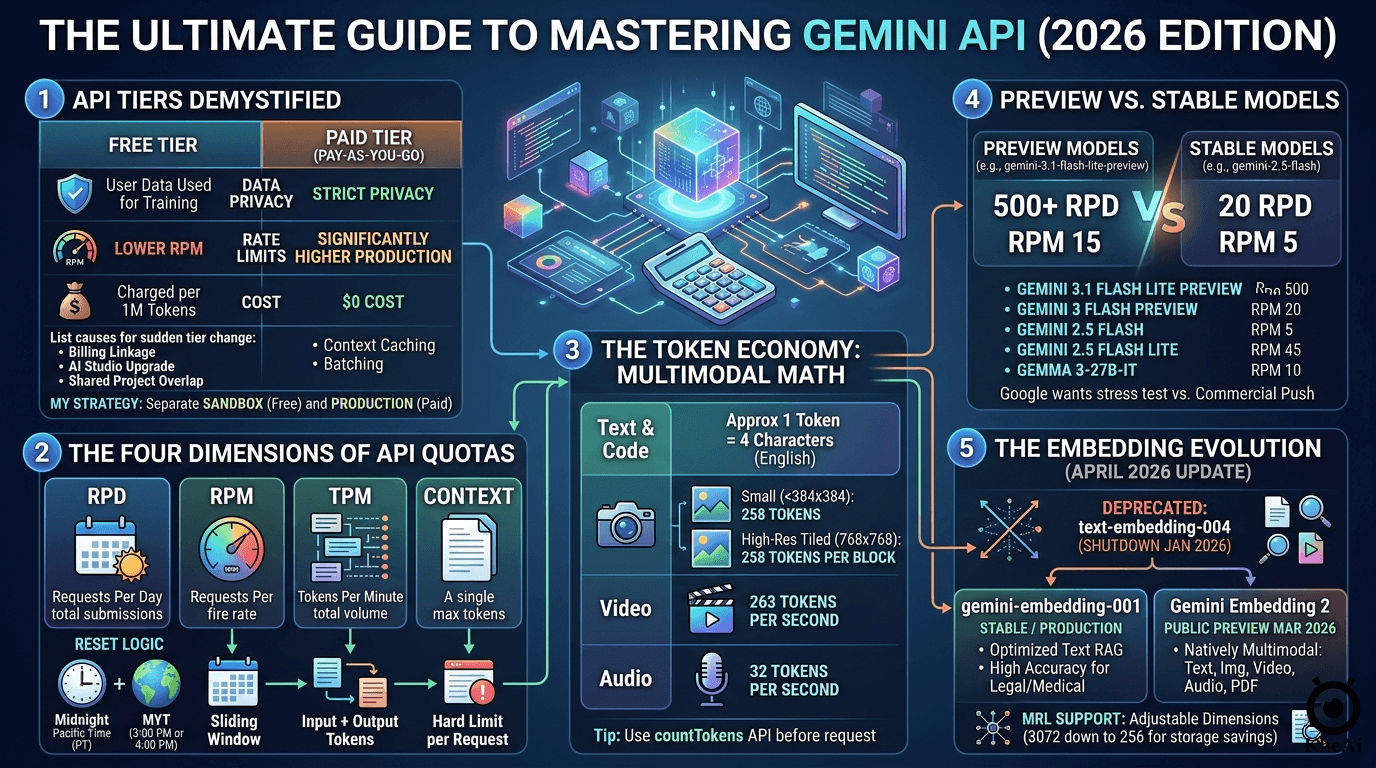
1. Demystifying the Gemini API Tiers
The Gemini API essentially operates on two parallel tracks: Free and Paid (Pay-as-you-go). Your tier is set at the project level within Google AI Studio or the Google Cloud Console.
Here is a breakdown of what separates them:
| Feature | Free Tier | Paid Tier (Pay-as-you-go) |
|---|---|---|
| Cost | $0 | Charged per 1 Million tokens |
| Data Privacy | Inputs may be used to train Google models | Strict privacy; data is not used for training |
| Rate Limits | Lower (e.g., 2–15 RPM depending on the model) | Significantly higher (Production-ready) |
| Access | Good access, but throttled on stable models | Full, unthrottled access to all models |
| Advanced Features | Basic prompting | Context caching, batching, high-res media processing |
The Engine: Google AI Studio
Your AI needs a massive context window so it doesn’t “forget” your code as your project grows.
- Go to Google AI Studio and generate a free Gemini API Key.
- We will rely on
gemini-3.1-flash-lite-previewfor its generous rate limits and speed, andgemini-3.1-pro-previewfor complex logic.
Why Did My Tier Change Suddenly?
One day you are prototyping for free, and the next, you are getting billed. If your project suddenly migrated to the Paid Tier, it is almost always due to one of these three triggers:
- Billing Account Linkage: You added a credit card or linked an active Cloud Billing account to your Google Cloud project.
- AI Studio Upgrade: You clicked the tempting “Set up billing” button in Google AI Studio to bypass a rate limit.
- Shared Project Overlap: You generated your API key inside an existing Google Cloud project that already had billing enabled for other services (like Cloud Run or Cloud Storage).
A common panic in the developer community is that enabling billing eliminates your free usage entirely. The truth is nuanced:
- Inside a Paid Project: Yes, the free lunch is over. Once billing is enabled for a specific project, every token is billable. There is no “free daily allowance” hidden inside a paid project.
- Across Your Account: No, you haven’t lost your Free Tier status entirely. The tier is project-specific. You can spin up a brand new project in AI Studio without billing and continue to use the Free Tier there.
My Strategy: Always separate your environments. I maintain a Sandbox Project (Free Tier) strictly for prototyping, testing agent logic, and hacking together ideas. Once the code is solid, I move the API keys over to my Production Project (Paid Tier) for actual deployment, ensuring enterprise-grade data privacy and higher limits.
How to Revert to the Free Tier
If you upgraded by mistake, you can revert by navigating to the Google Cloud Console’s Billing section and unlinking the billing account from your specific project. To prevent surprise charges on paid projects, always utilize the Project Spend Caps feature in AI Studio (e.g., capping it at $5.00/month).
2. The Four Dimensions of API Quotas
Google doesn’t just track how much you use the API; they track how you use it across four simultaneous buckets. If you hit the ceiling on any of these, you will be met with a stubborn 429: Quota Exceeded error.
| Metric | Definition | Reset Logic |
|---|---|---|
| RPD (Requests Per Day) | Total times you hit “Submit” in a 24-hour period. | Resets at Midnight Pacific Time (PT). |
| RPM (Requests Per Minute) | How fast you are firing off requests. | Sliding window (last 60 seconds). |
| TPM (Tokens Per Minute) | The sheer volume of data being processed. | Sliding window (Input + Output tokens). |
| Context | The maximum tokens allowed in a single prompt. | Hard limit per individual request. |
The Timezone Hack for Heavy Workloads
Google’s RPD reset happens at Midnight Pacific Time. Because I am based in Puchong, Malaysia (MYT, UTC+8), this daily reset doesn’t happen while I am asleep.
Depending on US Daylight Saving Time, Midnight PT translates to exactly 3:00 PM or 4:00 PM MYT.
The Workflow: If I burn through my 500 RPD quota in the morning while aggressively testing a new codebase, I don’t panic. I just schedule my AI agent’s heavy maintenance tasks (like deep code audits or large batch generations) for the late afternoon, exactly when Google hands me a fresh batch of daily requests.
3. The Token Economy: How Costs are Calculated
Tokens are the atomic units of AI. While text calculation is straightforward (roughly 1 token = 4 characters of English text), multimodal inputs require specific math. When your AI agent “sees” an image or “hears” a video, Google converts that media into billable tokens.
Here is the exact token math for multimodal inputs as of 2026:
- Images: If an image is small (both dimensions under 384x384 pixels), it costs a flat 258 tokens. For higher resolution images, Google tiles the image into 768x768 pixel blocks. Each of those tiles costs 258 tokens.
- Video: Calculated at a fixed, predictable rate of 263 tokens per second.
- Audio: Calculated at a fixed rate of 32 tokens per second.
Pro Tip: You can always check your exact payload cost programmatically before firing off a request by utilizing the
countTokensAPI endpoint.
4. The Model Discrepancy: Preview vs. Stable
When looking at the Free Tier limits, you will notice a massive discrepancy between models. Why does a powerful preview model give you 500 requests per day, while a stable, older model restricts you to 20?
- Preview Models (e.g.,
gemini-3.1-flash-lite-preview): Google offers massive quotas here because they want developers to stress-test the infrastructure. - Stable Models (e.g.,
gemini-2.5-flash): Once a model is battle-tested and production-ready, the free tier is heavily choked down to push commercial users toward the Paid Tier.
Here is my current cheat sheet for maximizing Free Tier efficiency:
| Model Variant | Category | RPM | RPD | TPM | Context Window |
|---|---|---|---|---|---|
| gemini-3.1-flash-lite-preview | Text | 15 | 500 | 250k | 1M |
| gemini-3-flash-preview | Text | 5 | 20 | 250k | 1M |
| gemini-2.5-flash | Text | 5 | 20 | 250k | 1M |
| gemini-2.5-flash-lite | Text | 10 | 20 | 250k | 1M |
| gemma-3-27b-it | Other | 30 | 14.4k | 15k | 128k |
Always checking the Gemini API Rate Limit (Free-tier) and Pricing. Limits are at the project level, sharing capacity across all API keys within a project.
5. The Embedding Evolution (April 2026 Update)
If you are building Retrieval-Augmented Generation (RAG) pipelines, the embedding landscape has drastically changed recently.
Key Differences in Google’s Embedding Models
| Feature | text-embedding-004 | gemini-embedding-001 | Gemini Embedding 2 |
|---|---|---|---|
| Status | Shutdown (Jan 2026) | Stable / Production | Public Preview (Mar 2026) |
| Primary Use | Text Only | High-Performance Text | Natively Multimodal |
| Supported Inputs | Text | Text | Text, Image, Video, Audio, PDF |
| Dimensions | 768 | 3,072 | Up to 3,072 |
| MRL Support | No | Yes | Yes (Adjustable 256–3072) |
Strategic Model Selection
- Migrate Immediately: If your legacy code relies on
text-embedding-004, it is broken. That model was fully deprecated in January 2026. - For Text-Heavy RAG: Switch to
gemini-embedding-001. It is highly optimized for complex technical, legal, or medical datasets where strict text accuracy is paramount. - For Next-Gen Applications: Use
Gemini Embedding 2. This natively multimodal model allows you to map completely different data types into a single vector space. You can literally use a text prompt to search across a database of MP4 videos, audio clips, and PDFs. - Save on Vector Storage: Both modern models utilize Matryoshka Representation Learning (MRL). This allows you to dynamically scale down your vector output dimensions (e.g., from 3072 down to 768 or 256) to save massive amounts of cloud storage costs while maintaining high accuracy.