As I’ve been shifting my focus toward building fully autonomous AI agents, I’ve been running PopeBot and the Pi coding agent heavily. The goal? True autonomy without blowing up a massive cloud bill right out of the gate.
In March 2026, the Google Gemini API Free Tier remains an incredible option for developers like us prototyping low-volume, high-reasoning tasks. But to make it work, you have to understand exactly how the API quota game is played, and how to outsmart hardcoded agent limitations.
What I learned about the PopeBot framework to route through two different Gemini’s Models for chat & agent sides, allowing me to stretch the free tier to its absolute limits.
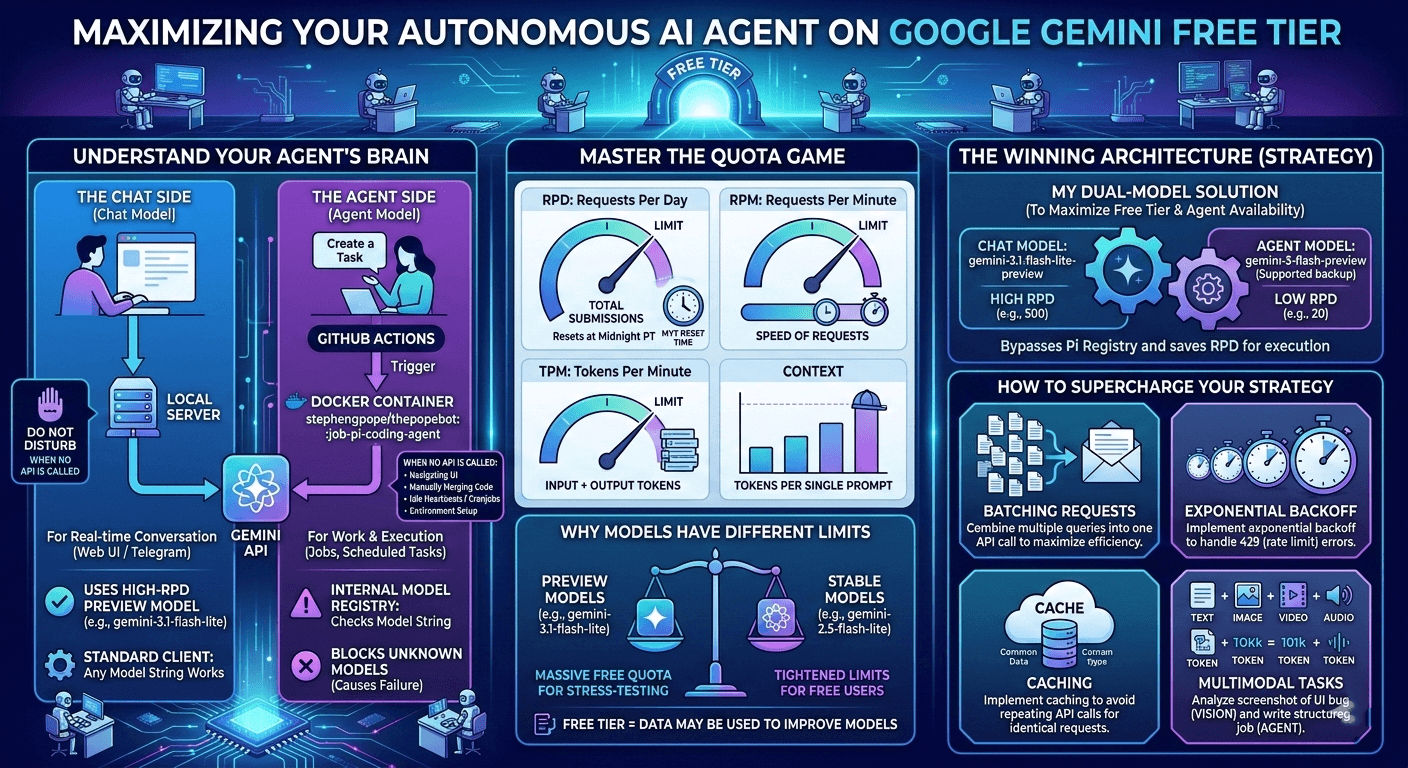
1. Understanding the Agent Brain: When is the API Actually Called?
Before optimizing, I had to figure out where my requests were going. PopeBot doesn’t just make a call every time it breathes. There are three distinct states:
- Silent (No API Calls): The bot does not hit the LLM during standard admin tasks. Navigating the web UI, manually merging PRs on GitHub, environment setups, and idle heartbeats (cron jobs checking for tasks) cost zero tokens.
- The Chat Brain (Real-time): Triggered when you text the bot via Web UI or Telegram. This runs on your local server. It takes your message, hits the “Chat Model” endpoint, and streams back text. The standard API client here is forgiving—it doesn’t validate the model string, it just passes it to Google.
- The Agent Brain (Execution): This is where the real work happens. When you assign a job (“Build an Airtable sync”), a GitHub Action spins up a Docker container for the Pi coding agent. It analyzes code, writes files, and commits.
The Trap I Hit: The Pi agent has an internal Model Registry. I tried feeding it gemini-3.1-flash-lite-preview (which has a massive free limit), but because it’s a new preview model, Pi didn’t recognize the string and killed the process before the API call even fired!
2. The Four Dimensions of API Quotas
Google tracks your free tier usage across four simultaneous buckets. Hit any of them, and you get slapped with a 429: Quota Exceeded error.
| Metric | Definition | Reset Logic |
|---|---|---|
| RPD | Requests Per Day. Total times you hit “Submit.” | Resets at Midnight Pacific Time (PT). |
| RPM | Requests Per Minute. How fast you fire requests. | Sliding window (last 60 seconds). |
| TPM | Tokens Per Minute. The volume of data processed. | Sliding window (Input + Output tokens). |
| Context | Total tokens allowed in a single prompt. | Hard limit per individual request. |
The Midnight Reset (Timezone Matters)
Since I am based in Puchong, Malaysia (UTC+8), the daily RPD reset doesn’t happen while I sleep. It resets at Google’s HQ in California (Midnight PT). That translates to exactly 3:00 PM or 4:00 PM MYT (depending on US Daylight Saving Time).
Strategy: If I burn my 500 RPD hacking in the morning, I just schedule my agent’s heavy maintenance tasks (code audits, dependency updates) for late afternoon when I get a fresh batch of requests.
3. How Tokens are Calculated
Tokens are the “atomic units” of the model. Google calculates them based on the modality of the data you send:
Text & Code
- Calculation: Approximately 1 token = 4 characters of English text.
- Calculation Method: The API uses a specific tokenizer. You can check the exact count before sending a request by using the countTokens API call.
Multimodal (Images, Video, Audio)
When your agent “sees” your screen or “hears” audio, it converts that data into tokens:
- Images: A standard image is 258 tokens. If it’s very high resolution, Google tiles it into 768x768 blocks, each costing 258 tokens.
- Video: Calculated at a fixed rate of 263 tokens per second.
- Audio: Calculated at a fixed rate of 32 tokens per second.
4. The Model Discrepancy: Preview vs. Stable
Why do different models have completely different limits?
- Preview Models (e.g.,
gemini-3.1-flash-lite-preview): Google gives you massive quotas (500+ RPD) because they want you to stress-test them. - Stable Models (e.g.,
gemini-2.5-flash-lite): Once a model is battle-tested, they choke the free tier down to 20-50 RPD to push commercial users to pay.
Note: On the free tier, Google may use your data to train models. Keep that in mind for sensitive codebases. Only the Paid Tier provides full data privacy.
5. My Solution: Dual-Model for Chat & Agent sides
Always checking the Gemini API Rate Limit (Free-tier) and Pricing. Limits are at the project level, sharing capacity across all API keys within a project.
I tested the chat/agent combination, that is working for me, to maximize the free-tier limits and with pi coding agent model availability.
| Model Variant | Category | RPM | RPD | TPM | CW | Pi |
|---|---|---|---|---|---|---|
gemini-2.5-flash (backup agent) | Text-out | 5 | 20 | 250k | 1M | 1 |
gemini-2.5-flash-lite (agent) | Text-out | 10 | 20 | 250k | 1M | 1 |
gemini-3-flash-preview (backup agent) | Text-out | 5 | 20 | 250k | 1M | 1 |
gemini-2.5-flash-preview-tts (failed) | Multi-modal | 3 | 10 | 10k | 1M | 0 |
gemini-3.1-flash-lite-preview (chat) | Text-out | 15 | 500 | 250k | 1M | 0 |
gemma-3-27b-pt / it (failed) | Other | 30 | 14.4k | 15k | 128k | 0 |
which is
●  Choose the LLM provider for your bot.
│
◇  Which LLM for your agent?
│  Gemini (Google)
│
◇  Which model?
│  Custom (enter model ID)
│
◇  Enter Google model ID:
│  gemini-3.1-flash-lite-preview
│
◇  Would you like agent jobs to use different LLM settings?
(Required if you want to use a Claude Pro/Max subscription for agent jobs)
│  Yes
│
●  Choose the LLM provider for agent jobs.
│
◇  Which LLM for your agent?
│  Gemini (Google)
│
◇  Which model?
│  Custom (enter model ID)
│
◇  Enter Google model ID:
│  gemini-2.5-flash-lite
│
result
◇  [8/8] Setup Complete!
│
◇  Configuration ─────────────────────────────────────────────────────────╮
│                                                                         │
│  Repository:   kafechew/keaibot                                         │
│  App URL:      https://your-url.ngrok-free.dev                          │
│  Chat LLM:     Gemini (Google) (gemini-3.1-flash-lite-preview)  [.env]  │
│  Agent LLM:    Gemini (Google) (gemini-2.5-flash-lite)  [GitHub var]    │
│  GitHub PAT:   ****cw3w                                                 │
│                                                                         │
├─────────────────────────────────────────────────────────────────────────╯
│
To prove everything is wired up perfectly, type this message into your bot’s web chat UI:
Create a new file named `agent_test15.txt` in the `/logs` directory of the repository.
The file should contain the text 'Hello from the autonomous agent 15!'.
Can refer The Final Test.
6. Advanced Optimization Strategies
Because the Pi coding agent performs many small tasks (reading a file, analyzing, then writing), it is Request-heavy rather than Token-heavy. To keep this autonomous loop running smoothly, I implemented a few more safeguards:
- Exponential Backoff: The Gemini free tier is volatile. I ensure there is an exponential backoff with jitter on API calls. If the agent hits an RPM limit, it gracefully pauses and retries instead of burning through the quota in a spiral of 429 errors.
- Context Management: Sending 100k tokens 20 times a minute will kill your TPM limit. I rely on Drizzle ORM and SQLite to persist conversational memory, but I make sure the agent only reads the files it absolutely needs to edit, rather than swallowing the whole repo every time.
- Multimodal Routing: When I find a UI bug, I just drop a screenshot in the chat. The 3.1 Flash-Lite vision capabilities analyze the image and write a highly specific CSS job ticket for the Agent side to execute later.
7. Update: Use gemini-3.1-flash-lite-preview for both Chat & Agent
By upgrading thepopebot from 1.2.72 to 1.2.73-beta.34, via
npx thepopebot upgrade @betaRemember to update your LLM_MODEL too near keaibot/settings/variables/actions!
The Takeaway
By combining GitHub’s free compute with Google’s free reasoning models, you can bootstrap a highly capable autonomous agent with zero overhead. It just takes a little bit of architectural gymnastics to keep the rate limits happy.