When I first set up GitNexus and Graphify to solve the “structural blindness” of my AI coding agents, I felt like I had given them a perfect map of my physical codebase. But as my workspace grew, I hit a completely different wall. Beyond my raw code lay a messy graveyard of unstructured human knowledge: architectural design notes, system diagrams, web-scraped engineering blogs, customer logs, and technical presentations.
Traditional Retrieval-Augmented Generation (RAG) completely fails here. It chops documents into random, isolated paragraphs, scores them based on simple keywords, and drops them into a chat box. The AI never builds a long-term memory. It treats every single prompt like day one.
To fix this, I set out to implement Andrej Karpathy’s LLM Wiki Pattern. I didn’t just want a file index; I wanted a self-healing, compounding digital encyclopedia where everything connects. To do it, I built KGT (Knowledge Graph Transformer)—a custom local workspace engine that turns chaotic multi-modal files into an interconnected Obsidian knowledge graph.
This is my complete, hands-on architectural field guide to building an automated, self-healing memory layer from scratch.
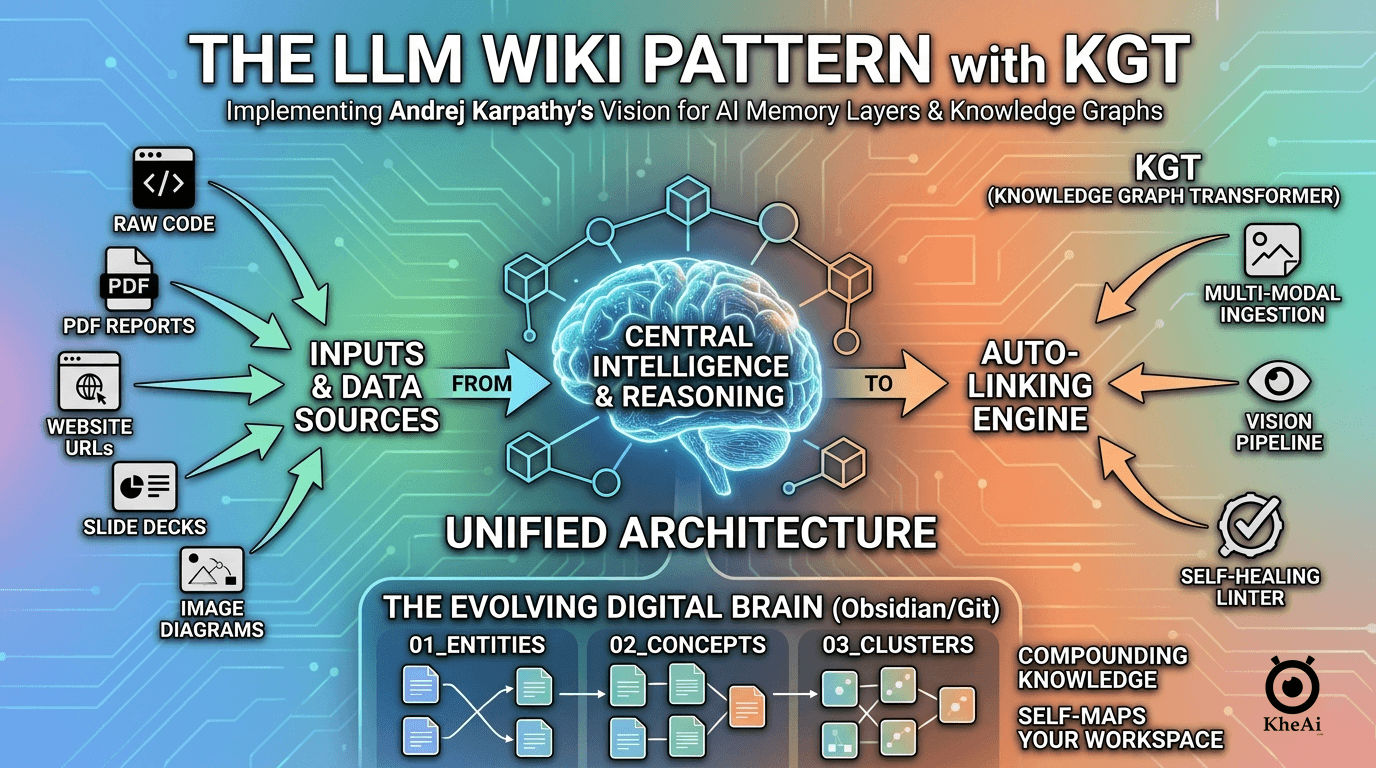
🏗️ The Three-Layer Architecture: Design Blueprint
A resilient knowledge base requires a separation of concerns. If you let an LLM read and write directly into a single folder without rules, it will quickly corrupt your data structures. I designed my knowledge base (kb/) using a strict three-layer framework:
kb/
├── raw/               # 1. The Immutable Source Layer (.pdf, .png, .md, urls)
├── schema/            # 2. The Strict Schema Layer (Rules, configs, linters)
│   ├── schema.json
│   ├── linter.py
│   └── ingest_vision.py
└── wiki/              # 3. The Compounding Wiki Layer (Atomic Obsidian Nodes)
    ├── 01_entities/
    ├── 02_concepts/
    ├── 03_clusters/
    ├── CoreIndex.md
    └── logs.md
1. The Immutable Source Layer (kb/raw/)
This is the intake ground. Raw assets go here and are never directly modified. Keeping sources clean ensures that if I ever want to wipe out my graph and rebuild it using a different organizational framework, my primary documents remain pristine.
2. The Compounding Wiki Layer (kb/wiki/)
This is the living graph. The LLM breaks down rich documents into atomic, single-topic Markdown notes. Every file uses explicit [[WikiLinks]] to point to related items, forming a dense web of information. It uses three sub-folders to enforce separation:
01_entities/: Concrete elements like specific companies, platforms, products, or code libraries (e.g.,browserstack.md).02_concepts/: Abstract patterns, methodologies, and engineering principles (e.g.,snake_case.md).03_clusters/: High-level macro themes that bundle multiple concepts and entities together (e.g.,code_quality.md).
3. The Schema Layer (kb/schema/)
The rulebook. Without a schema, an AI left to its own devices will write chaotic formatting styles, introduce duplicate tags, or break file patterns. The schema acts as a programmatic contract that forces the LLM to write uniform files.
🔧 Building the Engine Room: Configuration and Core Code
Here is exactly how I built, configured, and integrated the system scripts to bring this automated knowledge ecosystem to life.
1. The Operational Blueprint (kb/schema/schema.json)
This file explicitly defines my vault rules and constraints. When KGT processes text, it reads this configuration first to ensure exact formatting alignment:
{
  "vault_name": "Knowledge Base",
  "naming_convention": "lowercase_with_underscores (e.g., cloud_architecture.md)",
  "categories": {
    "01_entities": {
      "definition": "Concrete, distinct elements like specific people, specific organizations, products, or physical assets.",
      "allowed_frontmatter": ["type", "tags", "owner", "created_date"]
    },
    "02_concepts": {
      "definition": "Abstract theories, methodologies, engineering design patterns, software algorithms, or compliance policies.",
      "allowed_frontmatter": ["type", "tags", "domain", "difficulty"]
    },
    "03_clusters": {
      "definition": "High-level industry themes, domain categories, or macro-groupings that link multiple concepts together.",
      "allowed_frontmatter": ["type", "tags", "scope"]
    }
  },
  "graph_rules": [
    "Every document name must be unique.",
    "Search existing directories before creating a file to prevent structural duplication.",
    "Every file must contain a 'links' array in the frontmatter containing valid [[WikiLinks]].",
    "Every text file body must contain a minimum of two inline semantic [[WikiLinks]]."
  ]
}
2. The Vision Ingestion Pipeline (kb/schema/ingest_vision.py)
Microsoft MarkItDown is an exceptional tool for processing basic text files, but it lacks sight. To process architectural screenshots, structural diagrams, or slide presentations, I wrote a script that bridges MarkItDown with Google’s native OpenAI-compatible gateway. It automatically reads my project’s .env configuration file to run Google’s low-latency gemini-3.1-flash-lite model for high-fidelity visual OCR processing.
import os
import sys
from pathlib import Path
from openai import OpenAI
from markitdown import MarkItDown

def load_env_file():
    env_path = Path(".env")
    if env_path.exists():
        for line in env_path.read_text().splitlines():
            if line.strip() and not line.startswith("#") and "=" in line:
                key, val = line.split("=", 1)
                os.environ[key.strip()] = val.strip()

def process_visual_document(input_path_str):
    load_env_file()
    input_path = Path(input_path_str)
    output_path = input_path.with_suffix(".md")

    gemini_key = os.environ.get("GEMINI_API_KEY")
    if not gemini_key:
        print("Error: Missing GEMINI_API_KEY inside your .env configuration.")
        sys.exit(1)

    print(f"Initializing Gemini Multimodal Pipeline for: {input_path.name}...")

    # Route through Gemini's official OpenAI-compatible endpoint bridge
    client = OpenAI(
        api_key=gemini_key,
        base_url="https://googleapis.com"
    )

    md = MarkItDown(
        enable_plugins=True,
        llm_client=client,
        llm_model="gemini-3.1-flash-lite"
    )

    try:
        result = md.convert(str(input_path))
        output_path.write_text(result.text_content)
        print(f"Success! Gemini extraction compiled into: {output_path}")
    except Exception as e:
        print(f"Execution Error during conversion sequence: {str(e)}")
        sys.exit(1)

if __name__ == "__main__":
    if len(sys.argv) < 2:
        print("Usage: python ingest_vision.py <path_to_file>")
        sys.exit(1)
    process_visual_document(sys.argv[1])
3. The Graph Self-Healing Linter (kb/schema/linter.py)
To prevent the knowledge graph from rotting over time, I created a programmatic linter. It scans the vault locally to detect dead links (links pointing to non-existent notes), isolated orphaning notes, or illegal metadata configurations without using any external LLM api tokens.
import os
import re
import json
from pathlib import Path

WIKI_DIR = Path("kb/wiki")
SCHEMA_FILE = Path("kb/schema/schema.json")

def clean_name(name):
    return name.strip().lower().replace(" ", "_").replace("[", "").replace("]", "")

def run_graph_audit():
    with open(SCHEMA_FILE) as f:
        schema = json.load(f)

    all_files = {}
    all_links = {}

    for root, _, files in os.walk(WIKI_DIR):
        for file in files:
            if file.endswith(".md") and file not in ["logs.md", "CoreIndex.md"]:
                norm_name = file.replace(".md", "")
                all_files[norm_name] = Path(root) / file
                all_links[norm_name] = []

    dead_links = []

    for name, path in all_files.items():
        content = path.read_text()
        links = re.findall(r"\[\[(.*?)\]\]", content)
        for link in links:
            target = clean_name(link.split("|")[0])
            if target not in all_files:
                dead_links.append((name, link))
            else:
                all_links[target].append(name)

    orphans = [name for name, incoming in all_links.items() if len(incoming) == 0]

    print("## 📊 KGT Knowledge Graph Diagnostic Report\n")
    print(f"**Total Tracked System Nodes:** {len(all_files)}")

    print("\n### ❌ Dead Link Anomalies")
    for source, target in dead_links:
        print(f"- `{source}.md` references non-existent node: `[[{target}]]`")

    print("\n### 🏝️ Orphaned Nodes (Lonely Notes)")
    for orphan in orphans:
        print(f"- `{orphan}.md` has zero inbound connections.")

if __name__ == "__main__":
    run_graph_audit()
🤖 Declaring the Protocol: My AI Agent Skill Specification
To turn these standalone tools into an executable workflow, I encapsulated everything into a custom skill manifest for my AI terminal agents (like Claude Code) at .claude/skills/kgt/SKILL.md. This guide instructs the AI exactly how to execute commands, avoid planning loops, and run system diagnostics cleanly.
---
name: kgt
description: Knowledge Graph Transformer. Ingests raw files (PDFs, web URLs, images, slides) into structured atomic Obsidian nodes following the Karpathy LLM Wiki pattern, or runs deep graph link linting diagnostics.
---

# LLM Wiki Pattern Protocol

This protocol enforces the Andrej Karpathy LLM Wiki pattern to ingest unstructured files into the Webby Group's structured Obsidian graph, or audit its structural health.

## 🧭 Routing Logic (Determine Action First)
- **If the input parameter is `--lint`:** Skip all ingestion steps and immediately execute the **Linting Workflow** instructions at the bottom of this protocol.
- **If the input parameter is a file path or URL:** Execute the **Multi-Modal Ingestion Pipeline** steps below using the target argument.

---

## 🏗️ Multi-Modal Ingestion Pipeline

### Step 1: File Processing Branch
Analyze the file extension or prefix of the target input asset and choose the appropriate processing route:

- **Route A (Visual and Presentation Layouts):** If the file is an image (`*.png`, `*.jpg`, `*.jpeg`) or presentation deck (`*.pptx`), invoke the multimodal vision script:
  `python kb/schema/ingest_vision.py <input_file_path>`
  *(This script leverages gemini-3.1-flash-lite to handle OCR, graphic translations, and output a raw markdown file).*

- **Route B (Standard Documents and Web Links):** If the file is any other non-markdown asset (e.g., `*.pdf`, `*.docx`, `*.txt`) or an external web HTTP/HTTPS URL, invoke the baseline MarkItDown CLI engine:
  `markitdown <input_file_path> -o <target_markdown_path>`

- **Output Enforcements:** Always save the parsed markdown outputs into the `kb/raw/` directory. Use an identical filename, but convert it to `lowercase_with_underscores` and swap the extension to `.md` (e.g., `kb/raw/Annual Report.pdf` becomes `kb/raw/annual_report.md`).
- Read the final markdown content into memory before proceeding to Step 2.

### Step 2: Guardrailed Schema Matching
- Open and read the explicit constraints defined in `kb/schema/schema.json`.
- Evaluate the ingested markdown text against the structural categories defined in the schema: Entities, Concepts, and Clusters.

### Step 3: Execution & File Creation (Zero Planning Loops)
- **CRITICAL**: Do not output conversational text blocks asking for confirmation, outlining file paths, or entering planning loops.
- **Deduplication Check:** Search the active vault target directories (`kb/wiki/01_entities/`, `kb/wiki/02_concepts/`, `kb/wiki/03_clusters/`) using file search tools. Identify if a note already exists for an extracted entity to prevent duplicate creations.
- **Naming Rule:** All created file names must be strictly formatted in `lowercase_with_underscores.md`.

#### Format Matrix for Node Creation:
```markdown
---
type: [entity | concept | cluster]
tags: [relevant-tag]
links:
  - "[[existing_node]]"
  - "[[related_node]]"
---
# Name of Item

## Brief Description
[Clear 2-3 sentence overview derived explicitly from the source material]

## Knowledge Network Relations
- This item is connected to [[associated_concept]] because of its design attributes.
- See also [[related_cluster_theme]] for broader operational scale.
```

### Step 4: Logging & Verification
- Verify that every written node is physically placed in its correct category directory.
- Append a timestamped, single-line entry to `kb/wiki/logs.md` tracking the transformation activity:
  `- [YYYY-MM-DD HH:MM] Ingested raw asset <filename>. Generated nodes: [[node_a]], [[node_b]].`

### Step 5: Output Summary
- Output a single, brief sentence summarizing the count of new nodes generated or existing nodes updated.


---

## 🛡️ Linting Workflow (`/kgt --lint`)

Execute a comprehensive network scan across all folders inside `kb/wiki/` to isolate and fix structural anomalies:

1. **Dead Links:** Scan all `.md` files under `kb/wiki` for standard `[[TargetLink]]` markers. If the corresponding `target_link.md` file does not physically exist in any category folder, flag it as a Dead Link.
2. **Lonely Notes (Orphans):** Check all valid node files to see if they have exactly zero incoming link markers pointing to them from other vault notes.
3. **Mismatched Schema:** Parse all node frontmatter blocks against `kb/schema/schema.json`. Flag any document missing mandatory structural keys or violating the lowercase file naming rule.

### Output Action Matrix:
- Output a clean, non-verbose table highlighting all discovered vault discrepancies.
- Provide a strict, programmatic action checklist to fix anomalies. If a dead link can be cleanly resolved by stripping out the stale text citation wrapper, proceed with automatic correction without waiting for a user prompt.
🖥️ Setting up the Knowledge UI (Obsidian Dashboard)
A graph is only as good as your ability to view and traverse it. I use Obsidian as my primary workspace user interface to track how my data compounds in real time.
- Initialize Vault: Open Obsidian, select “Open Folder as Vault”, and point it directly at the compiled knowledge folder:
kb/wiki/. - Enable Plugins: Open Obsidian Settings (gear icon) -> Community Plugins -> Turn ON Community Plugins. Click “Browse”, search for the Dataview plugin, install it, and enable it.
- Build the Real-Time Core Dashboard: Create a file at
kb/wiki/CoreIndex.mdand insert the following Dataview block. It parses your atomic folders and auto-generates a live table mapping your entire ecosystem:
# 🧠 Intelligence Brain Index

```dataview
TABLE
  type as "Node Type",
  links as "Outgoing Connections",
  file.mtime as "Last Updated"
FROM "01_entities" OR "02_concepts" OR "03_clusters"
SORT file.name ASC
```

### 📈 Global Knowledge Base Audit Logs
```dataview
LIST FROM "logs"
```
🚀 Running Ingestion and Maintenance: My Day-to-Day Operations
With the infrastructure complete, running the system is incredibly smooth. The AI agent seamlessly determines file contexts, parses media structures, and updates the Obsidian vault automatically.
Running a Web-Scraped Ingestion Command
To extract structured concepts from an online engineering guide, I simply prompt my terminal agent:
/kgt https://browserstack.comBehind the scenes, the pipeline calls Route B. MarkItDown strips the website’s headers/footers, saves the text to raw storage, and Gemini instantly extracts atomic cards (browserstack.md, snake_case.md, code_quality.md) complete with matching bi-directional [[WikiLinks]].
Ingesting an Image or Infrastructure Blueprint
To digest a layout screenshot or system architecture slide deck:
/kgt kb/raw/system_architecture_diagram.pngThe routing engine switches to Route A, kicking off ingest_vision.py. Gemini processes the visual layout, performs full OCR translation, and structures the design contents directly into my atomic schema subfolders.
Running Graph Maintenance
To sweep for dead connection links or broken parameters across my entire vault:
/kgt --lintThe engine completely skips document loading and triggers the local python audit. It spits out an instant blueprint table isolating orphan nodes and dead links, auto-correcting trailing formatting errors on the spot.
By moving beyond simple, text-chopping RAG search frameworks and combining GitNexus, Graphify, and the LLM Wiki Pattern via KGT, I have built a permanent memory layer for my AI workspace. My software agents have structural code safety nets, my visual workflows are instantly searchable, and my human knowledge base gets smarter, cleaner, and more connected every single day.