When GitHub rolled out Copilot Free, I didn’t just blindly hit the “Install” button and assume it was a watered-down gimmick. I dug into the documentation, cross-referenced the release notes, and stress-tested the actual capabilities.
Copilot Free isn’t just a basic autocomplete toy. It is a highly capable, multi-model AI coding assistant that gives individual developers access to enterprise-grade tools—if you understand how to navigate its strict boundaries.
Here is everything I learned about how Copilot Free actually works, and how you can maximize its potential.
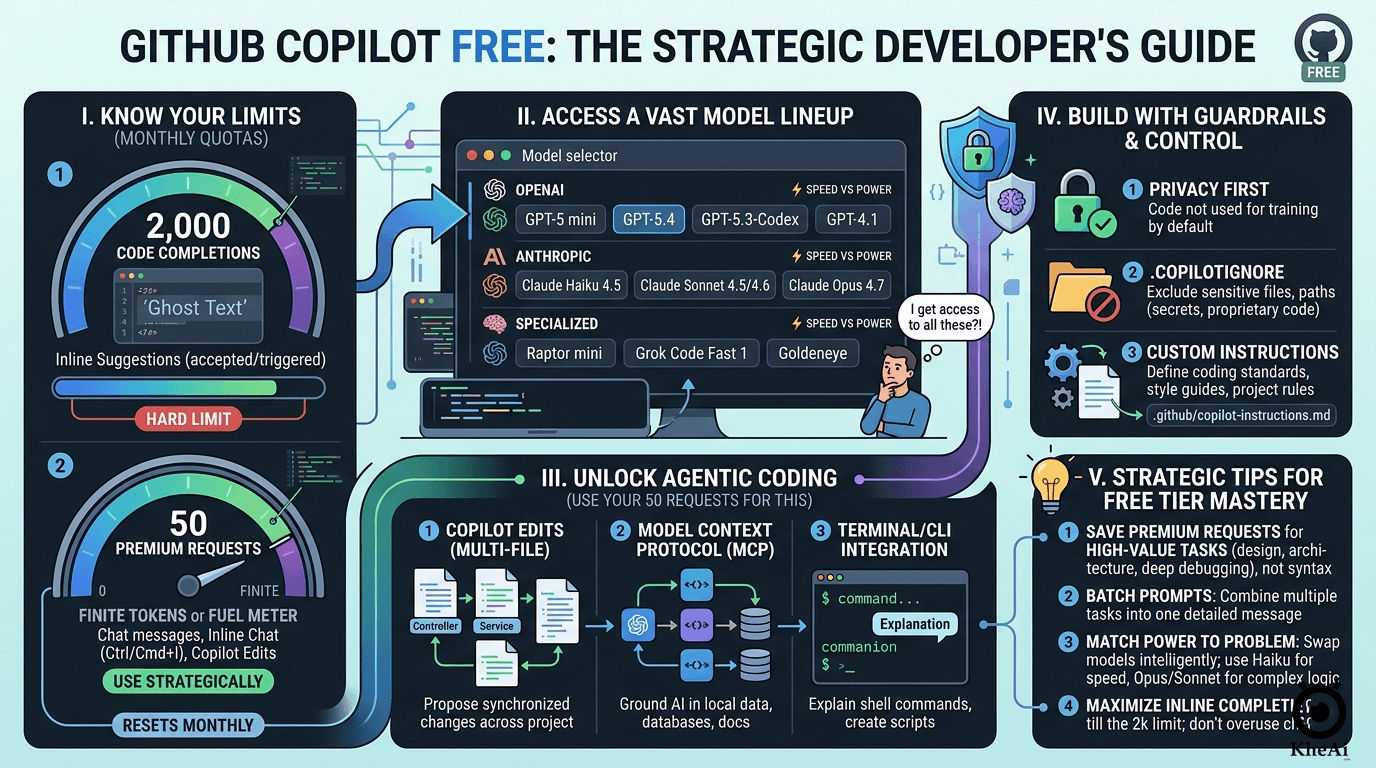
The Reality Check: Understanding the Quotas
The fundamental difference between the Free tier and the $10/month Pro tier isn’t about missing features; it’s about metered usage. GitHub gives you the keys to the Ferrari, but they only give you a specific amount of gas each month.
Your monthly usage is governed by two strict limits:
- 2,000 Code Completions: This is your “ghost text.” As you type, Copilot suggests the rest of the line or function. Once you hit 2,000 accepted or triggered completions, the AI goes quiet, and your IDE reverts to standard, non-AI intellisense.
- 50 Premium Requests (The Golden Currency): This is the most critical metric. You get exactly 50 manual interactions per month. This includes messages sent in the Chat sidebar, inline chat (
Cmd/Ctrl + I), and any multi-file actions taken in Copilot Edits.
If you treat those 50 requests like a limitless chatroom, you will burn through your quota in an afternoon. You have to be strategic.
The Secret Arsenal: An Expanded Model Ecosystem
Here is where my skepticism was completely overturned. I assumed a free tier would lock you into an older, cheaper model. I was wrong. Copilot Free gives you access to an incredibly robust lineup of industry-leading models.
You aren’t stuck with one brain; you can swap them out depending on the task:
The OpenAI Lineup
- GPT-5 mini: Your default, balanced workhorse. Fast and highly accurate for standard completions.
- GPT-5.2 & 5.4: The heavy hitters. When you need complex architectural planning or deep refactoring, you switch to these.
- GPT-5.3-Codex: A specialized variant specifically tuned for long-context code understanding.
- GPT-4.1: Still available if you prefer its specific reasoning patterns.
The Anthropic Claude Lineup
- Claude Haiku 4.5: Blisteringly fast. Perfect for when you just need a quick regex explained or a boilerplate unit test generated.
- Claude Sonnet 4.5 & 4.6: Currently the industry favorites for “vibe coding” (turning natural language into functional code).
- Claude Opus 4.7: The flagship reasoning model. Yes, you get access to Opus on the Free plan.
The Specialists
- Raptor mini: Ultra-low latency, designed specifically for rapid inline suggestions.
- Grok Code Fast 1: Built for rapid-fire CLI commands and shell scripts.
- Goldeneye: GitHub’s exclusive meta-model that aggregates your
@workspacecontext faster than standard LLMs.
The Catch: While you can use Opus 4.7 or GPT-5.4, remember your 50-request limit. Using a massive model for a trivial question is a waste of your golden currency.
Beyond Autocomplete: Agentic Coding for Free
GitHub didn’t gatekeep their newest workflow paradigms. Free users have full access to what I consider the future of software development:
1. Copilot Edits (Multi-File Agent)
You aren’t limited to asking questions in a sidebar. With Copilot Edits, you can highlight three different files, tell the AI, “Update the database schema here, and reflect the changes in the API controller and the frontend interface,” and it will propose synchronized edits across your entire workspace. Just remember: every “Generate” click costs one of your 50 Premium Requests.
2. Model Context Protocol (MCP)
This is a game-changer. MCP allows you to connect Copilot to external, local tools. You can hook it up to your local database schema or specific third-party documentation, grounding the AI’s answers in your specific, real-world setup rather than just its training data.
3. CLI Integration
You can use Copilot directly in your terminal to translate plain English into complex ffmpeg commands or Git rebases.
Guardrails and Customization
Because we care about accuracy and security, it’s vital to know how to control the AI. Copilot Free respects developer boundaries:
- Privacy Default: Your code snippets are not used to train GitHub’s underlying models.
- Content Exclusion: You can set up a
.copilotignorefile to completely blind the AI to sensitive files (like.envfiles or proprietary algorithms). - Custom Instructions: You can write a
.github/copilot-instructions.mdfile to dictate your coding standards. You can literally tell the AI: “I am a skeptic. Do not use deprecated libraries, always strongly type variables, and include error handling by default.” The AI will read this before every response.
The Evergreen Takeaway: How to Maximize the Free Tier
Copilot Free is a masterclass in bounded utility. It forces you to be a better prompt engineer. Here is my evergreen advice for surviving on 50 requests a month:
- Don’t use Chat for syntax. If you forgot how to write a
switchstatement in Go, Google it. Save your Copilot Chat requests for architecture, debugging complex state issues, or multi-file refactoring. - Batch your requests. Instead of asking five small questions, write one highly detailed prompt. Say: “Review this React component. 1. Find performance bottlenecks. 2. Suggest accessibility improvements. 3. Rewrite the state management using Redux.” That is three tasks for the price of one request.
- Use the right model. Default to GPT-5 mini or Claude Haiku for speed. Manually switch to Opus or Sonnet when you are asking the AI to design a complex system from scratch.
I went into this research expecting a toy. What I found was a powerful, professional-grade tool that rewards discipline. If you respect the limits and use the models strategically, GitHub Copilot Free is one of the most generous developer tools on the market right now.
Stay skeptical, double-check the AI’s output, and happy coding.