If you’ve been tracking the developer ecosystem this year, you know that OpenClaw (formerly Clawdbot and Moltbot) is the framework of the moment. Created by Austrian developer Peter Steinberger, it acts as an “exoskeleton” for large language models. Instead of a passive chat window, OpenClaw gives the AI persistent memory, terminal access, and browser control, all routed through the messaging apps you already use like WhatsApp, Telegram, or Discord.
The hype is deafening. Giving an AI unrestricted access to your local files and network is inherently dangerous. I am not always right, and neither is the machine—but we must strive for absolute accuracy when deploying these tools.
After spending the last month tearing down the v2026.3.x and v2026.4.x release cycles, performing code audits, and reading through the GitHub issues, I’ve compiled this definitive guide. Here is exactly how to stabilize, secure, and properly operate your OpenClaw deployment.
1. The Security Perimeter (Zero-Trust Operations)
When your personal assistant runs a local Gateway (defaulting to port 18789) and executes shell commands, security isn’t a feature; it’s the foundation. If you haven’t audited your setup recently, your machine is likely an open door.
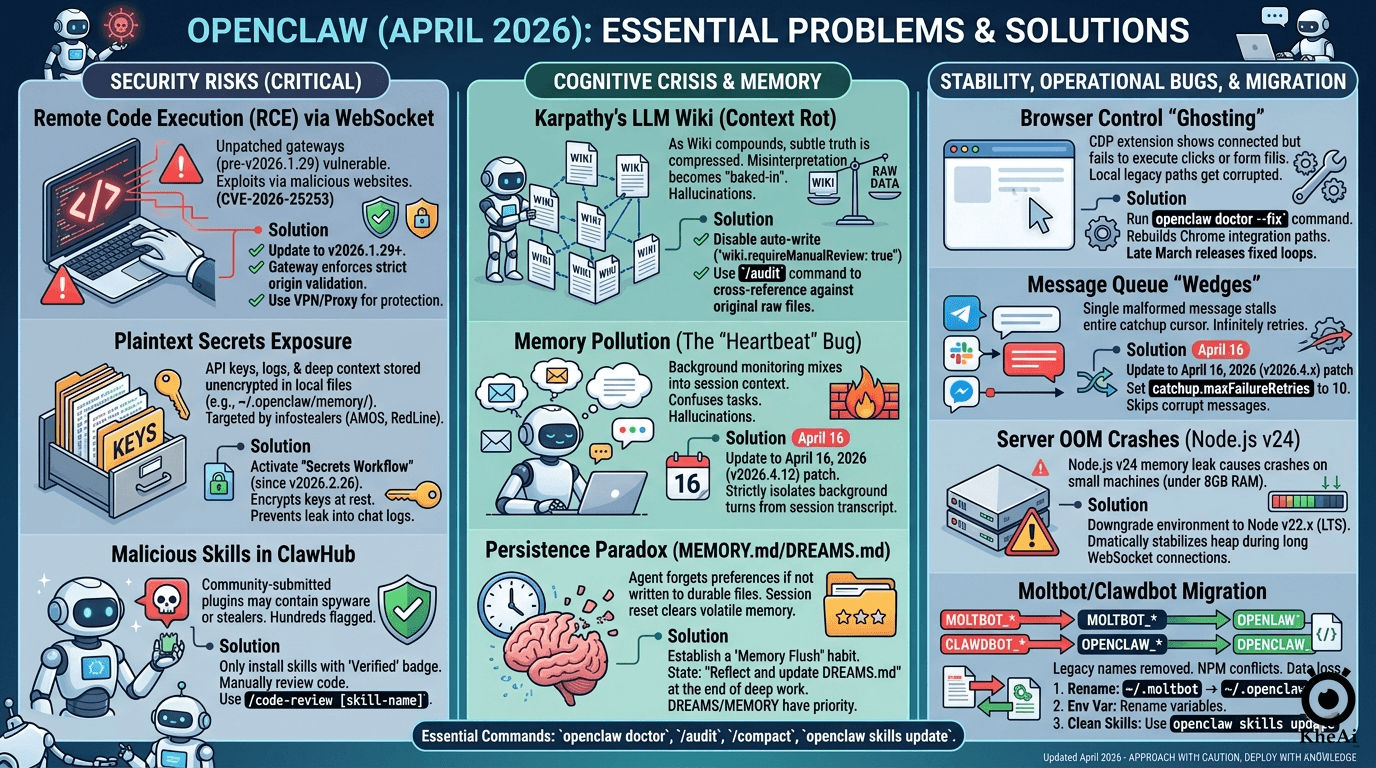
Remote Code Execution (CVE-2026-25253)
- The Reality: Security researchers found that malicious websites could silently connect to a local, unpatched OpenClaw Gateway. By bypassing authentication, attackers could execute arbitrary host commands via time-shifted prompt injections.
- The Fix: You must be on v2026.1.29 or newer. The Gateway now enforces strict origin validation.
- Operator Rule: Never expose your Gateway directly to the public internet on a VPS. Always bind the Gateway to the loopback address and use Tailscale Serve/Funnel or an SSH tunnel with strict token/password authentication.
Plaintext Secrets & Infostealers
- The Reality: Early OpenClaw builds stored LLM API keys and session memories in plaintext within the
~/.openclaw/memory/directory. Threat actors have updated infostealers (like RedLine and AMOS) to specifically target these folders. - The Fix: Activate the Secrets Workflow introduced in v2026.2.26. It encrypts your keys at rest and establishes a trust boundary so your credentials don’t accidentally bleed into the agent’s Markdown chat logs.
The ClawHub Malware Epidemic
- The Reality: OpenClaw’s extensible skills system is brilliant, but ClawHub is largely unvetted. Bad actors have uploaded hundreds of malicious
SKILL.mdplugins disguised as harmless automation helpers. - The Fix: Never blindly run
openclaw skills install. Only install plugins with the “Verified” badge. Even then, do the research: manually review the source code before granting the skill execution rights.
2. The Cognitive Crisis: Memory & Karpathy’s Wiki
The biggest architectural shift in the April 2026 builds is the implementation of Andrej Karpathy’s “LLM Wiki” concept. Instead of relying on a chaotic RAG (Retrieval-Augmented Generation) pipeline, OpenClaw now incrementally builds a structured Markdown Wiki of your life and projects. However, this introduces severe side effects.
Context Rot & The Loss of Truth
To build a wiki, the LLM must compress information. During this compression, subtle edge cases and the “original truth” of your instructions are often lost. Once the agent misinterprets a source document, that hallucination is permanently baked into your Wiki.
The Fix: Do not let the agent auto-write to the Wiki without oversight. Set wiki.requireManualReview: true in your configuration. Periodically run the /audit command so the LLM is forced to cross-reference its Wiki summaries against your raw source files.
Memory Pollution (The “Heartbeat” Bug)
OpenClaw uses a background “Heartbeat” process to monitor your emails and Slack while you sleep. Unfortunately, earlier builds accidentally mixed these background checks into the main conversation context, causing the agent to hallucinate that tasks were finished simply because it “saw” an email about them.
The Fix: The April 16, 2026 (v2026.4.12) patch is mandatory. It strictly isolates HEARTBEAT_OK turns from your active session transcript.
The Persistence Paradox
If a preference or instruction isn’t explicitly written to a persistent file, the agent will forget it the moment its token window resets.
The Fix: Develop a Memory Flush habit. Before concluding a deep-work session, explicitly state: “Summarize our progress and update DREAMS.md with our next steps.” By forcing writes to DREAMS.md or MEMORY.md, your agent’s context survives system reboots.
3. Stability & Eradicating “Ghost Bugs”
Even when secure and cognitively stable, the daily operation of OpenClaw has been plagued by regressions that look like system failures but are actually software bugs.
- Browser Control “Ghosting”: If you ask the agent to scrape a site and the Chrome extension shows “Connected” but nothing clicks, your integration paths are corrupted. Drop into your terminal and run
openclaw doctor --fixto rebuild the local CDP paths. - Message Queue Wedges: A single malformed payload in WhatsApp or Telegram can stall the Gateway’s catchup cursor, causing an infinite retry loop that freezes the agent. Ensure you have the mid-April patch and configure
catchup.maxFailureRetries: 10in your settings. - Node.js Memory Leaks: If your Gateway crashes continuously on a smaller machine (like a 4GB VPS), it is likely hitting the Node.js v24 memory leak. Downgrade your environment to Node v22.x (LTS) for a dramatically more stable heap during long-running WebSocket connections.
4. The Great Migration Blueprint (Moltbot to OpenClaw)
The rebranding from Moltbot/Clawdbot to OpenClaw broke legacy configurations. If you are finally updating your system, follow this exact sequence to prevent catastrophic data loss:
- Backup Your Mind: Never upgrade without a snapshot. Run
tar -czf workspace-backup.tar.gz ~/.moltbot/workspace/. - Rename the Core: Do not let the system create a blank slate. Manually rename your base directory:
mv ~/.moltbot ~/.openclaw. - Environment Variable Purge: Open your
.bashrcor.zshrc. The system no longer reads legacy variables. You must rename everyMOLTBOT_*orCLAWDBOT_*variable toOPENCLAW_*(e.g.,OPENCLAW_HOME). - Dependency Resolution: Strip out any manual NPM plugins. Native ClawHub modules will conflict with them. Strictly use the
openclaw skills updatecommand to let the native package manager resolve dependencies. - The Final Audit: Run
openclaw doctor. This will flag any missing configuration fields required by the new Memory-Wiki subsystem.
The Bottom Line
OpenClaw is a breathtaking piece of engineering. It successfully bridges the gap between text generation and actual, physical computing tasks. But autonomy without architecture is just automated chaos.
Treat OpenClaw like a highly capable, yet heavily flawed junior employee. Isolate its environment, encrypt its secrets, curate its memory, and verify its actions. By running a skeptical, disciplined setup, you can harness the power of this framework without compromising your machine.