OpenClaw has generated an immense amount of hype recently. The tool has drawn mass attention from outside the tech industry, spawning a wave of third-party services like overpricing simple installations and removals, and major cloud providers offering one-click deployment options. However, while the tool is exceptionally powerful, it is easily marketed to those who do not genuinely need it. Many individuals believe they need a heavy AI agent system when they might only require a more specific automation tool or a more organized workflow.
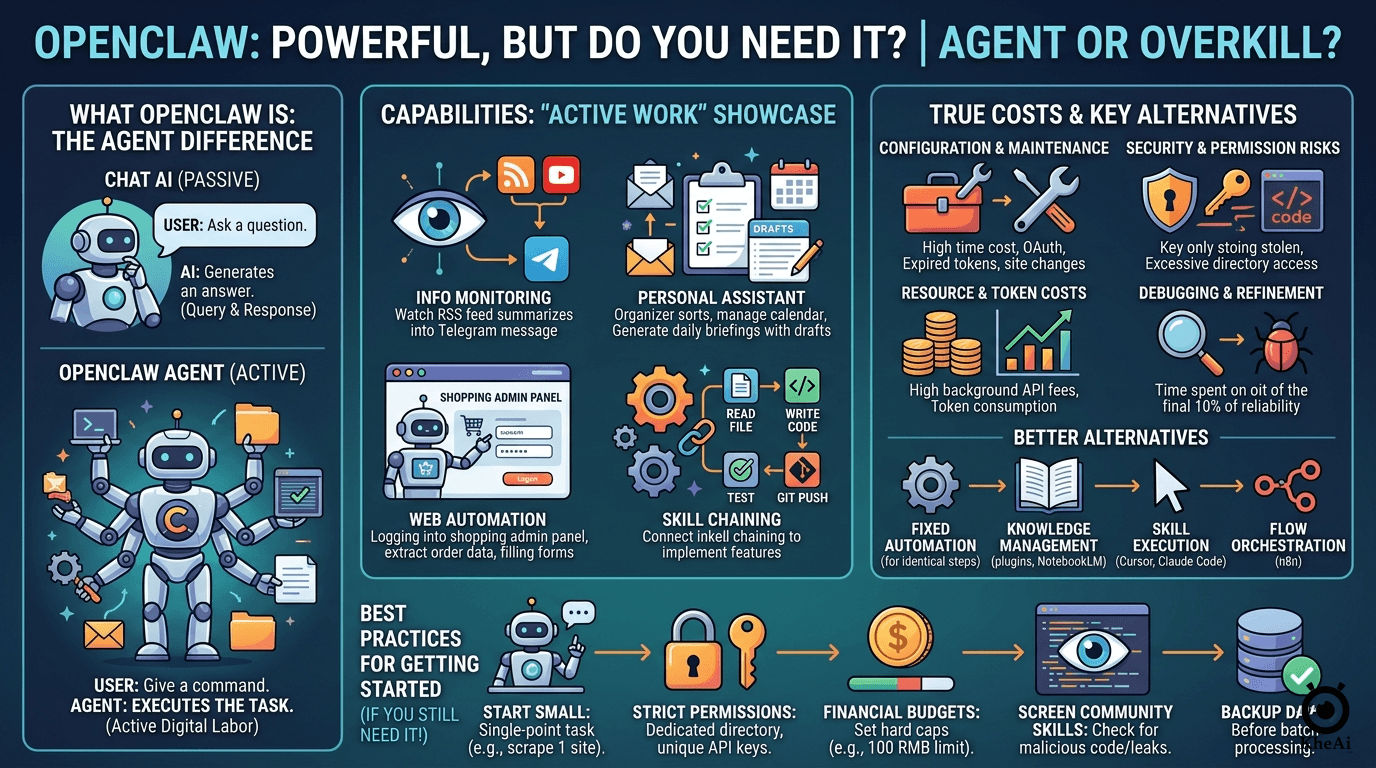
How OpenClaw Operates
Traditional AI conversational tools function strictly on a query-and-response basis. You send a prompt, and the AI generates a reply. OpenClaw differs fundamentally because it acts as an autonomous “agent” that executes tasks on your behalf. Its capabilities include:
- Organizing local folders and reading local files.
- Categorizing and synthesizing data.
- Running scripts directly on your computer.
- Interacting with external databases and messaging platforms like Telegram.
- Operating a web browser autonomously (e.g., opening web pages, clicking buttons, extracting specific content, and filling out forms).
For technical experts, using automated agents to write code, conduct research, or draft articles is a routine part of their daily workflow. For non-technical users accustomed only to chatting with AI, seeing a system perform active digital labor feels revolutionary, often inciting “AI anxiety” and prompting people to feel forced to install it. However, high capability does not equate to high necessity for every user.
Common Use Cases Among Real Users
People who have deployed OpenClaw generally use it for four primary types of applications:
- Information Monitoring and Synthesis: Users program the agent to monitor specific RSS feeds, video channels, Reddit threads, and stock market indices. When an update occurs, the agent automatically reads, summarizes, and forwards the data. For example, some have it scrape financial news every morning, analyze community discussions about certain stocks, and send an AI-generated summary to Telegram. Content creators use it to monitor competitor feeds, pulling the title, description, and the transcript of the beginning of a new video to summarize the main points and archive them in a database.
- Personal Assistant Tasks: It is used to manage email accounts, read calendars, and synthesize to-do lists. A common setup involves checking an email inbox at a specific time daily, sorting incoming emails into folders, replying to routine messages, filtering spam, and generating a daily briefing report with draft replies that the user can confirm the following morning.
- Web Automation: It can handle repetitive web chores. This includes logging into e-commerce dashboards, extracting daily order statistics, checking for customer alerts or messages, and organizing this data into a spreadsheet automatically sent to a work chat group.
- Executing and Chaining Skills: The agent can be loaded with custom or community-sourced “skills” (mini-programs). If a developer has separate skills written for reading files, writing code, executing tests, pushing to Git repositories, and sending notifications, they can simply command the agent to implement a specific feature. The agent will autonomously decide which skill to use first, chain the workflow together, and finish the job.
The Four Hidden Costs of Running an Agent
The software’s impressive feature set obscures significant financial and cognitive overheads:
- Configuration and Maintenance Costs: Setting it up is not as simple as downloading an app. Users are required to maintain a continuous operating environment and external skill protocols. If a messaging platform’s bot token expires or a monitored website alters the position of its buttons, the automation will break. Building a simple routine that reads emails and pushes them to Telegram can easily require a couple of hours of debugging OAuth tokens, API keys, and script parsers. Even after a successful run, authentication sessions regularly expire, forcing manual intervention. This is a continuous maintenance cost rather than a one-time setup.
- Security and Permission Risks: Granting an agent execution permissions introduces heavy security risks. Users must decide which directories the AI can access and which commands it can run. If folder permissions are too broad, the AI can read private documents or system configuration files. If API keys are loosely managed, they risk exposing database entries or private workspaces. There have been recorded instances where users installed community-made skills that secretly contained malicious code designed to steal sensitive API keys.
- Resource and Token Costs: Background agents are active consumers of model APIs and cloud resources. Running an agent to scrape web pages and summarize reports daily for a week can easily cost over MYR 50 in API fees, even when utilizing cheaper underlying language models. For more complex tasks or higher execution frequencies, these costs escalate rapidly. In many cases, standard programmatic tools can do the exact same data retrieval at a fraction of the token cost.
- Debugging and Refinement Overhead: AI agents frequently get tasks almost perfect, but miss minor details. Refining that final percentage of reliability demands extensive time adjusting workflows and appending conversational contexts. An agent reading a webpage might mistakenly treat embedded advertisements as part of the main article text, or correctly understand nine fields of a complex form but fail on the tenth, ruining the entire submission process.
Exploring Better Alternatives
Many users do not need a fully functional agent system and would be better served by targeted alternatives depending on their specific goal:
- Deterministic Automation: If a task requires identical steps every time (e.g., relocating downloaded PDFs and renaming them by date), traditional automation software is far more reliable. It requires no continuous AI computation or API charges.
- Knowledge Management: For summarizing files or querying personal notes, native AI plugins, services like NotebookLM or Notion AI, or simply uploading documents directly to a heavy chat model are perfectly sufficient. Continuous background execution is unnecessary for occasional lookup tasks.
- Information Processing: Dedicated tools or APIs specifically tailored for data extraction or transcription run far more economically than asking a massive agent to handle those tasks via external loops.
- Running Skills: If you only need a functional space to execute code or specific skills rather than a system that makes autonomous decisions, products like Cursor or Claude Code are sufficient. They offer direct execution power without the security burdens of managing full backend agents. Many needs can be addressed by a standalone automation tool or a stable workflow orchestration platform like n8n.
Who Should Actually Use OpenClaw?
To determine if deploying an agent is worth the friction, a user should ideally check off multiple criteria:
- They must be willing to continuously debug, maintain, and adapt code or settings when APIs fail or site structures change.
- They have a genuine need for a system that is continuously online processing data in the background rather than executing one-off tasks.
- Their tasks actively span multiple distinct platforms (e.g., taking an input from a chat app, scraping a web page, outputting to a project management tool, and messaging the user back).
- They understand security boundaries and know how to monitor execution logs and set strict financial caps on API usage.
Best Practices for New Users
If a user evaluates the risks and still decides to deploy the agent, adherence to these guidelines is highly recommended:
- Start with Minimal Scenarios: Avoid building full personal assistant networks immediately. Start with a single, simple action, such as scraping one specific website at a scheduled time and pushing it to a chat. This allows for learning system configurations and log reading without massive initial complexity.
- Apply Strict Permission Limits: Do not grant the AI access to the entire computer. Isolate it inside a dedicated directory and use unique API keys restricted to specific service tasks. Only expand permissions once the setup proves stable.
- Enforce Financial Budgets: Cap API usage limits directly on the cloud provider’s dashboard to prevent unexpected massive bills (setting a hard cap of around MYR 100, for example).
- Vigilantly Screen Skills: Never run unverified custom skills from unknown community sources without first reading the code to ensure it does not leak data or access unapproved files.
- Back Up Crucial Data: Always generate backups before letting an AI agent batch-process or alter files on your machine to prepare for failed executions.
Ultimately, while agent systems represent a clear direction for the future of artificial intelligence, taking a step back to evaluate if your current problem actually requires this level of complex machinery will save time, effort, and money.