We’ve all played with ChatGPT and maybe tried Zapier or n8n. Those tools automate simple flows. But there’s a fundamental gap between a bot that talks and an agent that reliably acts on your behalf without leaking data, breaking things, or pretending it did something when it didn’t. I recently dug deep into PopeBot and built my own autonomous “Brain.”
TL;DR
- PopeBot is an open-source, Git-centric autonomous agent that treats a repository as its memory and GitHub Actions as its execution engine. Stephen G. Pope created the reference implementation.
- The design goal: autonomy + auditability + human control. Use Docker for isolation, Git for provenance, and PRs for human approval.
- Why this matters: you get the benefits of agents (automation, 24/7 work) while retaining developer-grade controls (code review, secrets handling, rollbacks).
- If you value transparency and risk mitigation more than raw instant responsiveness, this architecture is a fit.
Core idea: the repo is the agent
Most consumer agents hold ephemeral state and perform actions with little paperwork. PopeBot inverts that: the repository is the agent’s brain; every proposed change is a commit or a PR. Execution is a set of ephemeral workers triggered by Git operations or schedules.
This model gives you:
- Permanent audit trail (commits + PRs) rather than ephemeral logs.
- Human-in-the-loop gating before any capability becomes production (merge = permission).
- Reproducible compute via container images and GitHub Actions.
Key ecosystem pieces I relied on while building this:
- GitHub — repo, Actions, secrets, PRs.
- Docker — isolation for code execution.
- Next.js for web UI patterns (the Event Handler).
- Messaging and integrations via Telegram, Airtable, and Google (Drive).
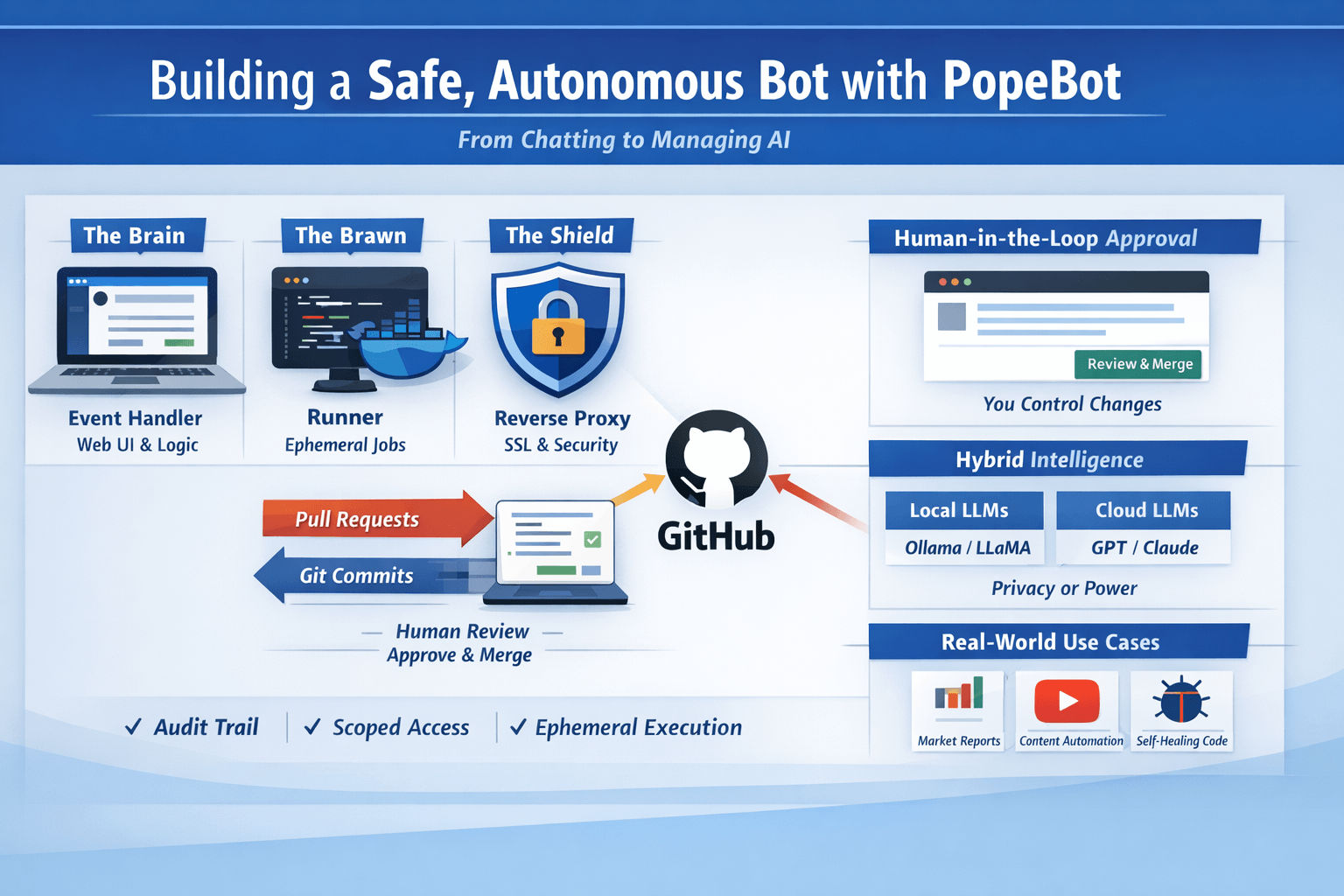
The three-container swarm (simple, secure separation)
I mentally split the system into three roles: Brain, Brawn, and Shield.
Brain — The Event Handler
- Runs the Web UI and inbound logic (e.g., Telegram webhook handlers).
- Does not execute untrusted code. It orchestrates: creates branches, files, and PRs.
- Typical stack: Next.js frontend + a small API server. It accepts prompts/requests and writes an “intent” into Git.
Brawn — The Runner (ephemeral worker)
- The place where code actually runs: ephemeral Docker containers spun up by GitHub Actions or self-hosted runners.
- If the agent hallucinates a loop or a destructive command, it only affects the sandbox container and the repo via commits/PRs — not your host OS.
Shield — The Reverse Proxy & TLS
- A front-facing reverse proxy (Traefik / Caddy / nginx) that manages SSL and external access. This is the gatekeeper for mobile access and public endpoints.
Why this matters: separating the “listener” from the “executor” prevents accidental escalation and keeps sensitive host resources private.
Human-in-the-loop firewall: GitHub as governance
This is what sold me. PopeBot enforces a developer-style workflow:
- Prompt the agent to build a capability (e.g., “connect to Airtable and append rows”).
- Agent writes code and opens a Pull Request in your private repo.
- You review the PR, run tests, and click “Squash and Merge.”
- Agent detects the merge, rebuilds, and the new skill becomes live.
Two practical benefits:
- The agent never has blind write access to its production code without your explicit approval.
- Every proposed change is human-reviewable, testable, and revertible (git revert).
For this to work you must:
- Keep your repo private or tightly scoped.
- Use fine-grained tokens and role-limited secrets in GitHub Secrets.
Hybrid intelligence: pick the brain for the job
You don’t have to pick one LLM or one runtime. I run a hybrid approach:
| Use case | Local (cost & privacy) | Cloud (power & features) |
|---|---|---|
| typical models | Ollama / local LLM runners (Llama, Mistral, Qwen) | Google (Gemini), Anthropic (Claude), OpenAI (GPT) |
| pros | full data locality, no API fees | stronger multi-step planning, better code generation |
| cons | limited by local hardware | data leaves your host; costs |
Choice checklist:
- Use local models (Ollama, local LLMs) for high privacy tasks and cheap prototyping.
- Use cloud models for heavy reasoning, code generation, or long-context tasks where you accept the tradeoff of API costs.
Principle of Least Privilege — how I scoped tool access
Giving an agent tool access is where most risk hides. I applied extremely conservative scoping:
- Airtable: created a scoped Personal Access Token limited to a single base. No master API keys.
- Google Drive: created a service account and a single Shared Drive/folder. Shared that folder with the service account email so the agent is pinned to one folder.
- Telegram / Webhooks: tokens kept in GitHub Secrets, injected at runtime only in the ephemeral worker.
Example: set a secret locally (terminal)
popebot secret set AIRTABLE_API_KEY <YOUR_SCOPED_TOKEN>(That CLI snippet is what I used to manage secrets locally — keep secrets out of commits and environment dumps.)
Security rules I enforce:
- Rotate tokens every 90 to 365 days.
- Use read-only tokens unless the agent needs write.
- Keep human-approval gates for any sensitive write operation.
How I teach skills (my workflow)
Skill-building is repeatable once you standardize a few pieces:
- Define intent (human prompt): clear acceptance criteria, e.g., “download YouTube transcript X, summarize to 300–500 words, save summary to Airtable record Y.”
- Provision scoped credentials for the skill.
- Prompt the agent to implement the skill. It creates a branch + PR that contains the code and tests.
- Review & merge the PR. Merge triggers an Action that deploys the worker or updates the running container.
- Monitor logs and the “self-healing” PRs the agent suggests.
I keep an explicit checklist in every PR:
- minimal runtime permissions
- unit test for logic (where possible)
- clear README for the skill
- rollback instructions
Real use cases I run (and time saved)
These are practical, repeatable workflows I automated.
1) 24/7 Financial Researcher
- Cron (heartbeat) runs at 06:00 local time.
- Agent fetches market data, generates a one-page PDF summary, and sends a Telegram alert.
- Result: I get a short, actionable summary before coffee.
2) Content Engine (YouTube → Blog)
- Job: download YouTube transcript, summarize, generate a hero image, push assets to Google Drive, log to Airtable.
- The agent creates the whole pipeline and injects metadata into the Airtable CMS automatically.
3) Self-healing maintenance
- Nightly job reviews error logs (last 24 hrs).
- Agent drafts a PR proposing fixes or better error handling.
- I review, test, and merge. The system gradually gets more robust with human oversight.
Operational mechanics: state, migrations, and memory
State matters. If you can’t tell whether a job ran, you lose trust in automation.
- Use a lightweight DB (SQLite is fine) for deterministic state and idempotency.
- I use an ORM with migrations so schema changes are reproducible (Drizzle-style migrations in JS/TS or Alembic for Python patterns).
- Never rely on ephemeral in-memory state for critical flows (deduplication, retries, checkpoints).
When an agent proposes a code change to state handling, the PR should include a migration and a plan to backfill/retrofit data.
Security & governance checklist (practical)
When you run an autonomous agent, follow these rules:
- No direct write access: The agent may propose changes via PRs, but merging is human action.
- Scoped tokens only: Issue tokens with the minimal scope and short expiry.
- Secrets as runtime-only: Inject secrets at container runtime via GitHub Secrets; do not place them in the repo.
- Ephemeral execution: Run untrusted code in ephemeral Docker containers that are destroyed after the job.
- Audit logs: Ensure every action ends up as a commit, a PR, or a GitHub Action run.
- Rate & cost protections: Add quota checks so your agent can’t eat your API budget or trigger provider throttling.
(Practical note: GitHub Secrets and Actions are powerful but observability and limits vary between org plans.)
Pros & Cons (operational tradeoffs)
Pros
- Zero-cost or low-cost compute model using GitHub Actions for many scenarios.
- Full audit trail: commits + PRs = evidence of intent and change.
- Human-in-the-loop safety: merge = go-live.
- Flexible: you can mix local LLMs and cloud models depending on sensitivity.
Cons
- Latency: GitHub Action cold-starts and PR cycles add delay compared to a local real-time agent.
- Git history clutter: heavy autopilot usage can produce many commits; you must treat the repo as a machine-generated ledger.
- GitHub limits: Actions minutes, rate limits, and API knobs can constrain scale.
- Less “resident” than a local daemon: it’s event-driven; it won’t be as seamless as an always-in-memory OS agent unless you add local runners.
Making PopeBot behave more like other agents — or vice versa
If you want more proactivity (closer to OpenClaw-like always-on behavior):
- Self-hosted runners: install GitHub self-hosted runners on machines you trust to give the agent local hardware access under controlled constraints.
- Frequent schedules: schedule Actions frequently (e.g., every 5 minutes) to mimic a heartbeat.
- Local bridge: create a webhook skill that communicates with a local listener for hardware tasks.
If you want to make other always-on agents safer:
- Git-sync memory: persist their memory directory to Git, push hourly, and use PRs for proposed logic changes.
- Docker sandboxing: run always-on agents inside restricted containers with only the mounts they need.
Maintenance & roadmap (how I keep it stable)
- Heartbeat: cron jobs drive scheduled tasks; I treat the heartbeat as the system’s check-in.
- Auto-update: I periodically pull the origin project for security updates, open a PR in my private fork, and review before merging.
- Hardware split: as needs grow, move heavy runners to GPU-capable hosts while keeping the Event Handler (UI) lightweight.
- Observability: integrate a log aggregator to collect Action logs, container logs, and app telemetry.
Practical appendix: commands & patterns I used
Set a secret:
popebot secret set AIRTABLE_API_KEY <YOUR_SCOPED_TOKEN>Typical PR review checklist (copy into your repo template):
- Does the PR use scoped credentials only?
- Are the acceptance tests present and passing?
- Is there a rollback plan described?
- Does the PR introduce new secrets or change scopes?
- Does it add sufficient logging and idempotency?
Glossary (short)
- Repo-as-brain: Treat the Git repository as the agent’s memory and plan store (every idea becomes a commit/PR).
- Heartbeat: recurring scheduled job that triggers proactive tasks.
- Runner: ephemeral execution environment (container) that does the real work.
- Human handshake: the merge action that grants the agent a capability.
Final thoughts — my position
I built this because I wanted the productivity of autonomous agents without the risk of opaque, unreviewed changes to my systems or private data leakage. The Git-first approach means I can sleep at night: whenever my agent says “I fixed X,” I can inspect the PR, run tests locally, and revert if necessary.
If you prioritize transparency, provability, and developer-grade controls, the PopeBot pattern (repository = brain, Actions = muscles, PR = permission) is a practical architecture for real-world autonomous operations. If you prioritize instant, resident, always-on responsiveness and can accept higher exposure, that’s a different tradeoff — and you can still borrow governance patterns (git-sync, sandboxing, scoped tokens) to reduce risk.